First contact with NUBOMEDIA
At the heart of NUBOMEDIA we find the Kurento Media Server (KMS). KMS provides media capabilities to the NUBOMEDIA platform that can be used for creating a cloud media plane with the appropriate media capabilities and suitable for working with elastic scalability. This means that the number of KMS's is controlled by the NUBOMEDIA PaaS, scaling in and out depending on the load of the system.
Therefore, the first step to become a NUBOMEDIA developer, it is important to get in touch with Kurento. To that aim, it is recommended to take a look to the Kurento documentation. A simple way to learn about Kurento is to follow these steps:
- Read and understand the Kurento basis
- Install KMS in your local machine (Ubuntu)
- Run the kurento-hello-wold Java tutorial in your local environment
Once you completed this process, the next step is to use NUBOMEDIA to deploy and leverage our application in a cloud environment. In short, you can see NUBOMEDIA as a development platform with different scaffolding technologies:
- The NUBOMEDIA APIs and SDKs. NUBOMEDIA has been made for developers, and so, on the one hand a complete set of Java APIs is provided. On the other hand, SDKs for mobile development (for Android and iOS) is also provided out of the box by NUBOMEDIA. Above in this page you can find an overview of the different APIs and SDKs, which are explained in detail in next sections of this documentation.
- The NUBOMEDIA PaaS Manager. The PaaS manager can be seen as a tool aimed to control the way in which the NUBOMEDIA applications are built and deployed inside the NUBOMEDIA PaaS. Please keep reading to find more details.
NUBOMEDIA APIs and SDKs
From the developer’s perspective, NUBOMEDIA capabilities are accessed through a set of APIs. Hence, for creating NUBOMEDIA applications, developers just need to understand these NUBOMEDIA Development APIs so that they may use them for creating their rich RTC media applications. NUBOMEDIA offers a complete set of APIs that can be classified in three groups:
- Media Capabilities APIs. These APIs expose to the application logic the low-level media capabilities of NUBOMEDIA: Media, WebRtcPeer, and Repository API.
- Signaling APIs. The media capabilities APIs (Media, WebRtcPeer, Repository API) are signaling agnostic, meaning that they neither require nor assume any kind of specific characteristic for signaling. Hence, NUBOMEDIA capabilities can be accessed through any kind of signaling protocol including SIP, XMPP or REST. However, for simplifying common development tasks, NUBOMEDIA provides a simple Signaling API based on JSON-RPCs that is suitable for most applications not requiring specific interoperability features.
- Abstract Communication APIs. Developers typically use RTC media capabilities for creating applications devoted to person-to-person communications. In this case, the application business logic needs to manage the communication topologies among participants in an RTC multimedia session. In the general case, this logic needs to be programmed by the application developers. However, there are a number of communication topologies that are quite popular and appear systematically in applications. Due to this, in our architecture, we propose specific communication API abstracting the low level details of the media logic on these topologies so that developers may use them in an agile and efficient manner. In particular, we have identified two of these common topologies: the Room and the Tree topology.
All in all, NUBOMEDIA offers six different APIs. The following table provides a brief summary of these APIs:
| API | Description |
|---|---|
| Media API | Enables developers consuming the Media Server capabilities among which we can find media transport, media archiving, media processing, media transcoding, etc. |
| WebRtcPeer API | Abstracts the client WebRTC media capabilities, exposing the media capture and communication capabilities of a browser in a simple, seamless and unified way |
| Repository API | Makes possible to access an elastic scalable media repository for archiving media information and meta-information |
| Signaling API | Provides a simple signaling mechanism based on JSON-RPCs for applications. This API has can be used both in the application-server and in the client side |
| Room API | Enables application developers functionalities to create group communication applications adapted to real social interactions. This API has can be used both in the application-server and in the client side |
| Tree API | Allows developers to build video broadcasting web applications. This API has can be used both in the application-server and in the client side |
In addition, NUBOMEDIA offers a complete SDK to create mobile applications consuming the media capabilities provided by the NUBOMEDIA applications. You can find the following SDKs:
| SDK | Description |
|---|---|
| Android SDK | Android version of the client-side NUBOMEDIA APIs: WebRtcPeer, Signalling, Room, Tree |
| iOS SDK | Complete SDK to provide NUBOMEDIA client capabilities to iOS devices |
This set of APIs/SDKs is inspired by the popular Web three tier model. In this model, we can distinguish three layers:
- The Client, typically which consists on a web browser executing the client-side application logic. This logic is typically developed using programming languages such HTML and JavaScript, and with the help of specialized third party APIs (e.g. Angular, Bootstrap, etc.)
- The Application Server (AS), which hosts the server-side application logic. This layer typically contains the business logic of the application.
- The Service Layer comprise a number of services that are required for the application to work. In NUBOMEDIA, this layer is composed by a set of Media Servers (namely, Kurento Media Server) and a Media Repository (i.e. the Kurento Repository).
In the following diagram we can see how the different NUBOMEDIA APIs/SDKs fits in this three-tier model:
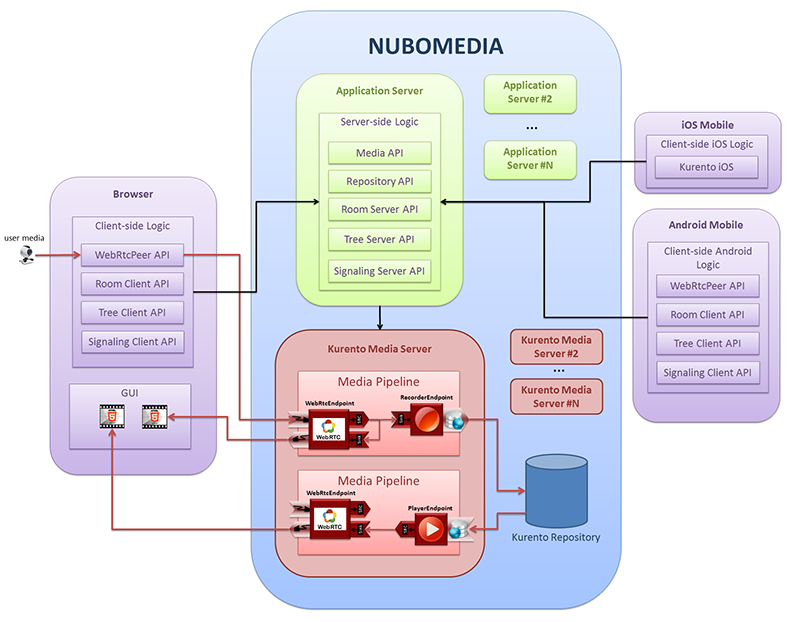
NUBOMEDIA Tree Tier Model (clients -- application-server -- service-layer)
NUBOMEDIA PaaS Manager
NUBOMEDIA is a PaaS, as therefore it makes possible to upload, deploy and execute developers’ applications written in the Java programming language with the NUBOMEDIA APIs described before. NUBOMEDIA PaaS elastically provides the service layer infrastructure (i.e. the needed instances of KMSs and a Media repository if needed) depending on the load of the system.
The capabilities provided by the Paas Manager can be used by developers in two ways:
- Using the PaaS GUI. The PaaS Manager GUI is a web application that allow to use the NUBOMEDIA PaaS Manager. This application can be found in the following link (the snapshots below show some examples of this GUI). Currently the access to this application is restricted. Nevertheless, if you need access to this application, please request for the credentials using in the NUBOMEDIA development mailing list.
- Using the PaaS Manager API. In addition to the GUI, the PaaS Manager exposes its capabilities by means of a REST API. Please take a look to the PaaS API documentation for further details.
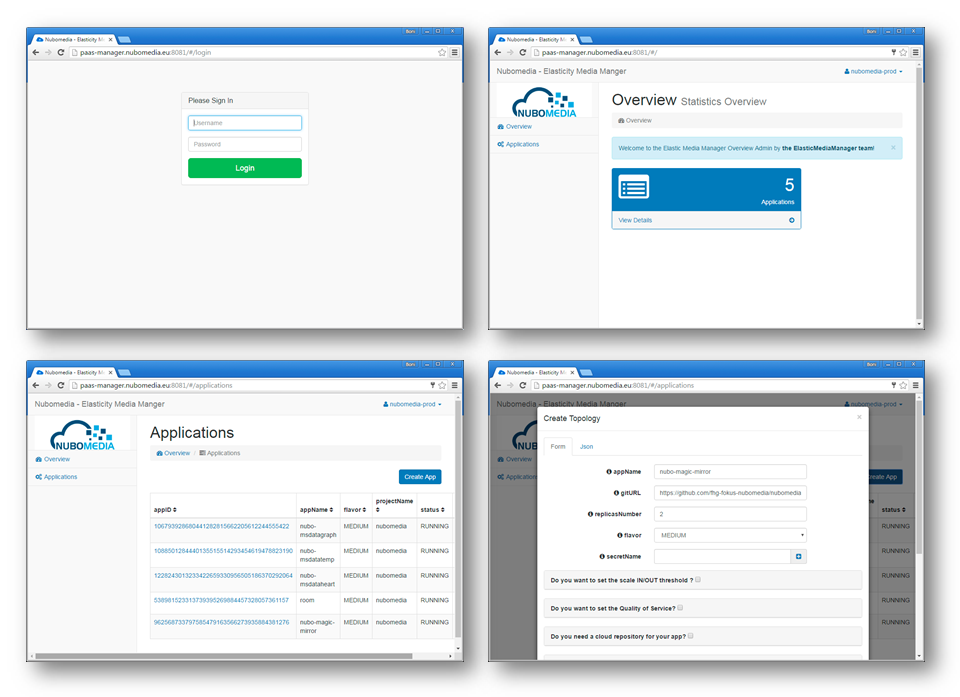
NUBOMEDIA PaaS Manager GUI Snapshots
The application server is also provided by the NUBOMEDIA PaaS. Due to the fact that the applications are made in Java, we recommend to use Spring-Boot as the application server side technology. Spring-Boot embeds a Tomcat server in a simple seamless way for developers. Please take a look to the tutorials for examples.
Running your first NUBOMEDIA application
Now let's see how to deploy an application on the NUBOMEDIA PaaS. It can be done by creating the application from the scratch, but in order to make this process easier, we recommend to use one the NUBOMEDIA tutorials as template, evolving the code according to the specific needs of your app. If you are using the Media API, you can use the magic-mirror tutorial to run your first application on NUBOMEDIA. Before doing that, please be aware of the following tips:
-
We recommend Spring-Boot as the base technology for NUBOMEDIA applications. Spring-Boot embeds a Tomcat server in a simple seamless way for developers. The application is packaged as a runnable JAR, and when this JAR is executed, the Tomcat server is started and the web application automatically deployed.
-
We recommend Maven as for managing the life-cycle and managing the dependencies of our applications.
-
We use GitHub to host the applications that are going to be deployed on NUBOMEDIA.
-
Internally, the NUBOMEDIA PaaS uses Docker containers to deploy applications.
Said that, a NUBOMEDIA application is basically a Java project that uses some of the NUBOMEDIA APIs and it can be deployed in the NUBOMEDIA PaaS. In order to configure the deployment, a file called Dockerfile should be located in the root of the repository (see reference documentation for more details).
Now let's see the example (magic-mirror tutorial). Once logged in the PaaS Manager, we have to click on the Create App button inside the Applications section and provide the GitHub URL of our project, in our case this URL is the following:
https://github.com/nubomedia/nubomedia-magic-mirror
Please visit the documentation page about PaaS Manager for further information about the meaning of the rest of configuration values. The most important values are illustrated in this picture:
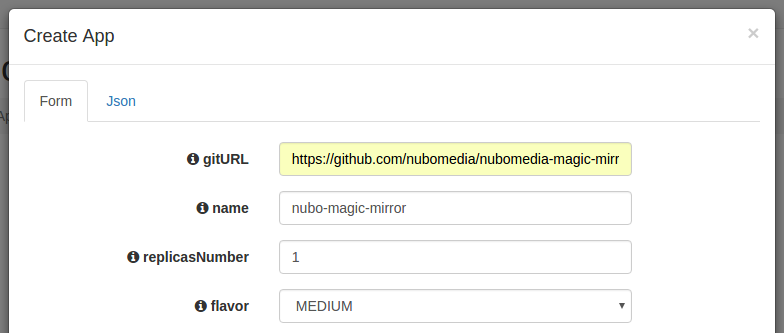
PaaS Manager Settings for Magic Mirror Tutorial
Then we need to click on the Create App button. The deployment should start, changing the state from CREATED to RUNNING (it takes a couple of minutes to finish):
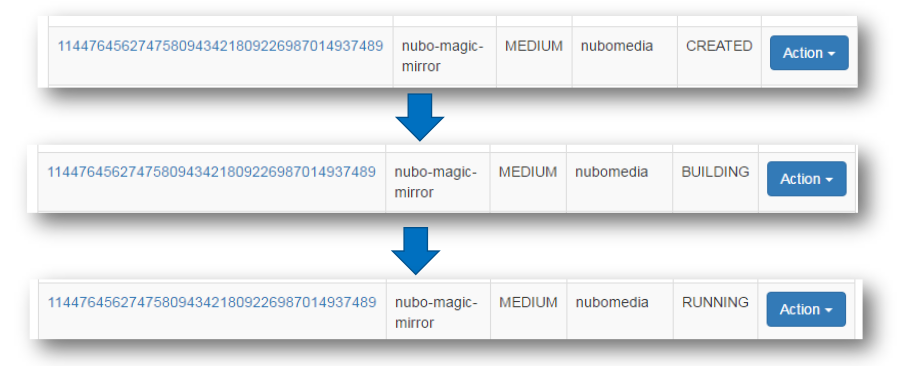
PaaS Manager deployment states
Once the deployment is finished (i.e., in the state RUNNING) we will be able to open the application by clicking on the provided URL by the PaaS. In addition, build and application logs can be accessed in order to trace our application, and monitoring charts are displayed to trace the resources consumption within the PaaS.
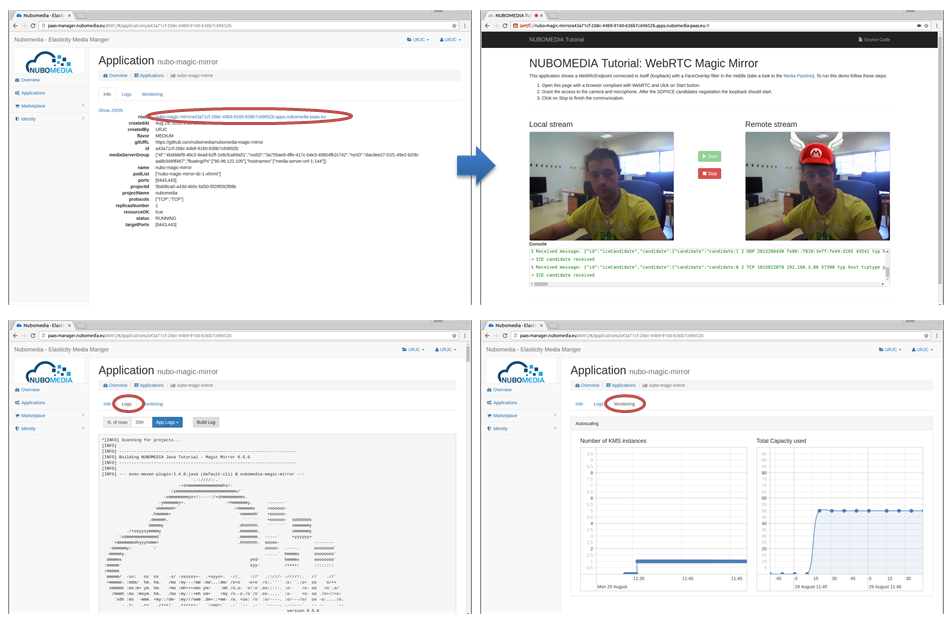
Simplified process to deploy and trace an application in the NUBOMEDIA PaaS Manager
What's next
Now that you are familiar with the NUBOMEDIA technology, you can create your own applications. To do that, you simply has to follow these steps:
- Think about your application with media capabilities
- Chose the NUBOMEDIA APIs/SDKs needed to implement it. NUBOMEDIA provides several running tutorials that can be used as templates to create new applications
- Deploy it in the PaaS Manager with the PaaS GUI or PaaS API
Moreover, NUBOMEDIA offers additional advanced features. Take a look to this documentation to know more about Video Content Analysis, Visual Development Tool, monitoring tools, or NUBOMEDIA Architecture.